




Do Solar Lights Charge on Cloudy Days? What to Expect from Cloud Cover, Panel Placement, and Battery Size

Yes, solar lights can still charge on cloudy days, but cloudy weather usually means less solar energy reaches the panel and less energy is stored for the night. That can show up as shorter runtime, lower usable brightness, or a battery that does not reach a full charge.
The important point is that “cloudy” does not mean “no sunlight.” Solar panels can receive both direct sunlight and diffuse sunlight scattered through the atmosphere. However, the amount available can vary dramatically between thin clouds, heavy overcast, rain, season, time of day, and location.
For an outdoor solar light, the better question is not simply, “Will it charge?” It is: Will the panel collect enough energy during the day to support the brightness and runtime you expect that night?
Clouds Reduce Available Energy, Not Necessarily Charging to Zero
Solar panels do not need to see a perfectly defined sun in a clear blue sky before they can generate electricity.
The U.S. Department of Energy explains that sunlight reaching the ground includes both direct-beam radiation and diffuse radiation created when sunlight is scattered by clouds, water vapor, dust, and other particles. Heavy clouds can eliminate most or even all direct-beam radiation while diffuse light remains.
That is why a solar light may continue charging during a gray day but still perform differently after sunset.
A bright overcast afternoon, for example, is very different from several hours of dark storm clouds. Both may be described as “cloudy,” yet the panel can receive very different amounts of solar energy.
This is also why a fixed statement such as “solar lights operate at 30% efficiency on cloudy days” is not particularly useful. Cloud thickness, location, season, panel angle, surrounding shade, and the solar cell itself all matter.
Think in Terms of a Daily Energy Budget
A solar light has a simple energy cycle:
- The solar panel collects energy during daylight.
- The battery stores part of that energy.
- The LED and electronics consume stored energy after dark.
If the panel collects less energy during a cloudy day, the battery may begin the night with a smaller energy reserve.
What happens next depends on how much power the light consumes.
A low-output decorative light may still run through much of the evening. A brighter floodlight operating at a high setting may use the available energy much sooner.
This means battery capacity by itself does not tell you how a solar light will perform after a cloudy day.
A Bigger Battery Does Not Guarantee Better Cloudy-Day Performance
Battery capacity is commonly listed in milliamp-hours, or mAh. A larger battery can store more energy under comparable electrical conditions, but only if the solar panel has enough time and available sunlight to charge it.
Consider two hypothetical systems:
- one has a smaller battery with a relatively strong panel;
- another has a much larger battery but a small panel.
After a limited-sunlight day, the second system does not automatically start the night with more stored energy simply because its battery has a larger capacity.
Panel output, battery capacity, charging electronics, LED power consumption, operating mode, and the available solar resource work together.
Our guide to what mAh means on a solar light explains this relationship in more detail.
Panel Placement Becomes Even More Important When the Weather Is Poor

Good panel placement cannot remove clouds, but it can prevent avoidable losses from making an already limited charging day worse.
Check for:
- roof overhangs;
- tree branches;
- fences;
- neighboring buildings;
- patio covers;
- accumulated leaves;
- dirt or debris on the panel;
- locations that only receive a narrow period of open-sky exposure.
A panel that receives acceptable energy on a clear summer day may perform differently when the sun is lower in the sky or when cloud cover reduces the available solar resource.
The Department of Energy notes that solar availability varies with time of day, season, location, atmospheric conditions, and the angle at which sunlight reaches the surface.
The goal is therefore not simply to put the panel “outside.” It should have the clearest practical exposure to the sky and available sunlight.
Cloudy Weather and Shade Are Two Different Problems
Cloud cover affects the solar resource across an area. Shade is a local obstruction.
A solar panel can therefore experience both at the same time.
Imagine a solar light mounted beneath the north-facing eave of a garage during an overcast day. The clouds are already reducing available sunlight, while the building itself further limits what reaches the panel.
Moving the same panel to an exposed section of the wall or roofline will not make the clouds disappear, but it may remove the avoidable building shade.
This distinction is particularly important for lights with integrated solar panels. The best place for the lamp is not always the best place for solar charging.
For more examples, see our guide to whether solar lights work in the shade.
Why a Separate Solar Panel Can Help

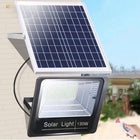
A separate-panel solar light gives you more freedom to solve the placement problem.
The lamp can illuminate a shaded garage entrance, shed wall, porch, driveway, or side yard while the solar panel is installed somewhere with better daytime exposure.
That does not mean a separate panel charges better through clouds simply because it is separate. Its advantage is placement.
For example, the NoxLumin Outdoor Solar LED Floodlight with Separate Panel & Remote uses a 5 m (16.4 ft) cable between the lamp and panel. The panel can therefore be positioned in an exposed location while the lamp is aimed where illumination is actually needed.


Current configurations range from approximately 450 to 3,000 lumens:
| Variant | Approx. output | Battery | Solar panel |
|---|---|---|---|
| 44 LED | 450 lumens | 1,000mAh LiFePO₄ | 6V / 2W |
| 100 LED | 1,000 lumens | 2,000mAh LiFePO₄ | 6V / 3W |
| 170 LED | 1,700 lumens | 3,000mAh LiFePO₄ | 6V / 3W |
| 228 LED | 2,000 lumens | 5,000mAh LiFePO₄ | 6V / 3W |
| 300 LED | 3,000 lumens | 8,000mAh LiFePO₄ | 6V / 6W |
The important lesson from this table is not that one battery size provides a guaranteed number of cloudy nights. It is that the panel, battery, and lighting load form one system.


Brightness and Timer Settings Matter After a Weak Charging Day

If your solar light offers adjustable brightness or timed operation, those controls can be useful when several days of poor solar conditions reduce the available stored energy.
The separate-panel NoxLumin floodlight includes adjustable brightness and 3-, 5-, and 8-hour timer options.
After a limited charging day, reducing brightness or choosing a shorter operating period can reduce nighttime energy consumption.
That is different from claiming the settings create additional battery capacity. They simply change how quickly the available stored energy is used.
If you need illumination for a specific period—such as the first few hours after sunset—a timer can sometimes be more practical than trying to keep the light operating at maximum output all night.
Several Cloudy Days Matter More Than One
One overcast afternoon does not necessarily tell you much about the condition of a solar light.
The battery may have stored energy remaining from previous sunny days.
Conversely, several consecutive low-sunlight days can gradually leave less energy available each night.
Weather history therefore matters.
The National Solar Radiation Database maintained by NREL provides solar irradiance and meteorological data rather than treating sunlight as a simple on/off condition.
For a small standalone solar light, you do not need to calculate a utility-scale solar model. The practical takeaway is simpler: judge performance over several representative charging cycles, not from one unusually dark day.
How to Improve Solar-Light Charging During Cloudy Periods
1. Remove unnecessary shade
Check the panel at different times of day rather than looking at it only when you install the light. Tree shadows and roof shadows move.
2. Keep the panel surface clear
Leaves, dust, bird debris, and other material can cover part of a small solar panel. Follow the product's cleaning instructions and avoid abrasive treatment that could damage the surface.
3. Use the most open practical panel location
A separate-panel system can be useful when the lamp itself must remain beneath an eave or beside a shaded structure. Keep cable routing safe and within the product's intended installation arrangement.
4. Reduce unnecessary nighttime consumption
If the product supports dimming or timers, select the amount of light and operating period you actually need. Maximum brightness is not automatically the best setting for every location.
5. Give the battery a good charging cycle before diagnosing a fault
If a light performs poorly after several dark days, allow it to charge under substantially better conditions before concluding that the battery or panel has failed. This helps separate a solar-resource problem from a hardware problem.
When Short Runtime May Indicate More Than Cloudy Weather
Weather should not become a universal explanation for every charging problem.
Look more closely at the light if performance remains poor after suitable charging conditions return.
Possible signs worth investigating include:
- the light does not operate after one or more good charging days;
- runtime remains unusually short even after strong daytime exposure;
- a separate panel or cable connection is loose;
- the panel is physically damaged;
- the light has accidentally been switched off;
- automatic nighttime operation remains disabled;
- the battery or another component has reached the end of its usable life.
Troubleshooting should begin with the operating instructions for the specific product rather than assuming the solar panel itself has failed.
What About Charging Solar Lights Through a Window?
Putting a solar light indoors beside a bright window is not equivalent to placing its panel outdoors with clear exposure.
Glass, building orientation, overhangs, screens, and changing sun angles can reduce the solar energy reaching the panel.
If indoor charging is part of your plan, read our separate guide: Can Solar Lights Charge Through a Window?
For outdoor solar lighting, direct outdoor panel placement remains the more predictable arrangement.
Do Not Judge Cloudy-Day Performance by Brightness Alone
A light that turns on brightly immediately after sunset may still have limited stored energy.
Brightness at 7:00 p.m. does not tell you how much energy remains for midnight.
Likewise, a light that automatically reduces output may be intentionally managing available battery energy rather than malfunctioning.
When comparing solar lights, look at panel specifications, battery capacity, light output, brightness controls, operating modes, timers, panel placement options, and expected charging conditions.
These attributes provide more useful information than one isolated runtime claim.
The Practical Answer
Solar lights can charge on cloudy days, but you should expect charging performance to vary.
Clouds reduce the solar energy available to the panel. A well-positioned panel can still collect diffuse sunlight, but it may not replenish the battery as fully as a strong clear day.
The most useful strategy is to maximize unobstructed panel exposure, avoid combining cloud cover with unnecessary local shade, keep the panel clear, match brightness and runtime to the energy available, and evaluate performance over several charging cycles.
A separate-panel design can be especially useful when the place that needs light is shaded but a nearby location has better daytime exposure. It does not defeat cloudy weather. It simply gives you more control over where the panel collects the available sunlight.
Frequently Asked Questions
Do solar lights charge when there is no direct sunlight?
Will a solar light fully charge on a cloudy day?
Why does my solar light turn off earlier after cloudy weather?
Is a bigger battery better for cloudy weather?
Does a separate solar panel work better on cloudy days?
Should I lower the brightness of a solar light after a cloudy day?
How do I know whether cloudy weather or a faulty light is causing short runtime?
Get more NoxLumin guides on Google
Add NoxLumin as a Preferred Source to help Google show you more of our outdoor lighting guides in Search and AI experiences.


Leave a comment